Log in
Linked Applications
Loading…
Spaces
Hit enter to search
Help
Online Help
Keyboard Shortcuts
Feed Builder
What’s new
Available Gadgets
About Confluence
Log in
公共知识库
Pages
Space shortcuts
故障排除文章
指导文章
Page tree
Browse pages
Configure
Space tools
A
t
tachments (3)
Page History
Page Information
Resolved comments
View in Hierarchy
View Source
Export to PDF
Export to Word
Pages
欢迎使用壹号知识库
指导文章
Jira links
EAS-新建枚举二次发布时,路径跑到根目录下的解决方案
Created by
刘少锋
on
2025-07-25
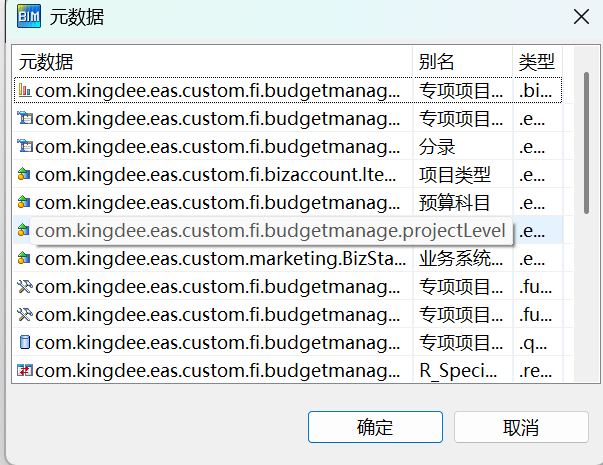
一、打开调用该枚举的单据,右键,查询-查看关联源数据,点击你的枚举
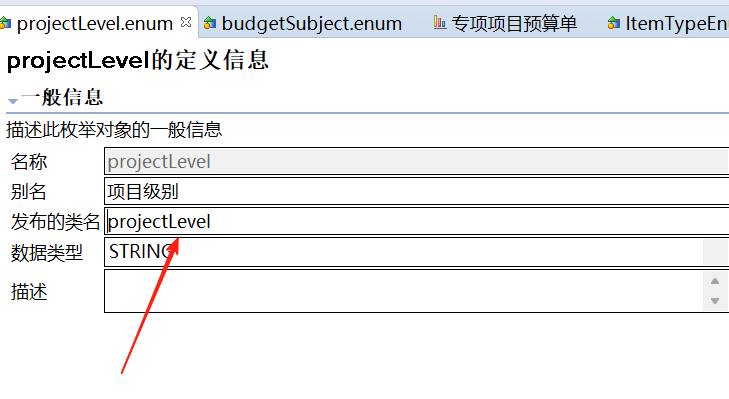
二、重点关注发布的类型,此时是没有任何前缀的
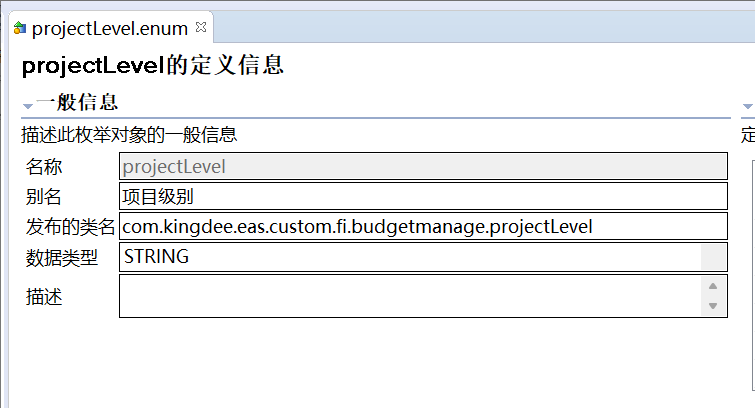
三、修改发布类型,改为正确的路径(路径是你建这个枚举时的路径)
四、发布即可
No labels
0 Comments
You are not logged in. Any changes you make will be marked as
anonymous
.
search
attachments
weblink
advanced
image-effects
image-attributes
Paragraph
Paragraph
Heading 1
Heading 2
Heading 3
Heading 4
Heading 5
Heading 6
Preformatted
Quote
Bold
Italic
Underline
Colour picker
More colours
Formatting
Strikethrough
Subscript
Superscript
Monospace
Clear formatting
Bullet list
Numbered list
Outdent
Indent
Align left
Align center
Align right
Link
Table
Insert
Insert content
Files and images
Link
Markup
Horizontal rule
Date
Symbol
Insert macro
User mention
Jira Issue/Filter
Info
Status
Gallery
Table of Contents
Other macros
Undo
Redo
Find/Replace
Keyboard shortcuts help
Edit
Preview
Save
Cancel
Overview
Content Tools
{"serverDuration": 95, "requestCorrelationId": "e6e3ceb0825deda7"}

0 Comments